How Upwork works
From defining your project to managing work and payments, this is how to work on Upwork


Post your project
Hire experts
Drive results
Feel confident in who you’re hiring
So the right choice feels clear, not complicated
.avif)
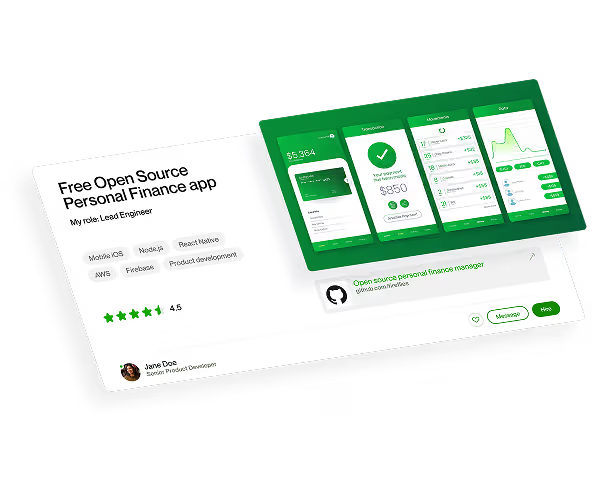
Browse freelancer portfolios to see real examples of their work.
.avif)
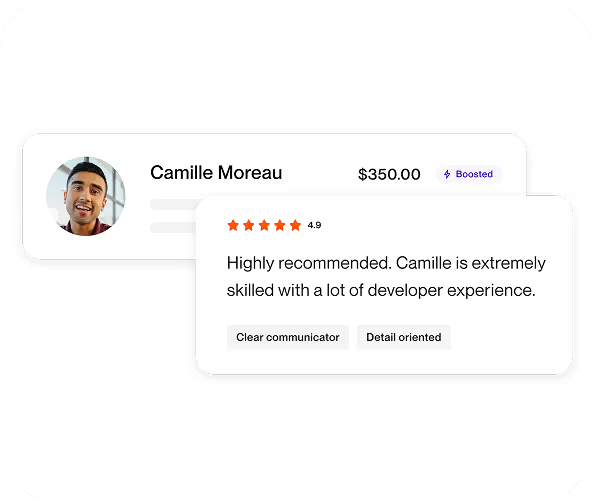
Read freelancer reviews to gauge their communication, reliability, and quality.
.avif)
.avif)
Message or video chat with freelancers to learn more about their experience and skills.
.avif)
.avif)
Let Uma highlight what matters most in each profile, so choosing the right fit feels easier.
.avif)
%20(1).avif)
Small business, substantial impact
Trusted by growing businesses
.png)

.svg)
.svg)

.svg)
%20(1).svg)


Frequently asked questions
Yes, it’s free to create an account and post a job on Upwork. You only pay once you start a contract with a freelancer.
Most clients hire within three days of posting a job. Once your job is live, freelancers begin submitting proposals. You can also invite specific freelancers to apply or review suggested freelancer matches to move faster.
No, you don’t need a fully defined scope to get started. You can browse freelancers by skill, experience level, location, and availability, review work history, and save profiles before posting a job.
Upwork is best used by companies of all sizes that need flexible, reliable freelance talent. While solopreneurs can use Upwork for one-off projects, the platform really shines when businesses use it to build teams, scale quickly, or bring in specialized skills without the cost of full-time hiring.
When you post a job, Upwork uses your project details—like skills, scope, budget, and timeline—to match you with relevant freelancers, who can then submit proposals, along with suggested candidates based on profile fit.
If you prefer, you can browse and filter freelancers yourself, review their work history and feedback, and invite those who stand out to apply.
Choose hourly contracts for ongoing work, evolving projects, or tasks where scope may change. Freelancers log their hours weekly, and you’re billed automatically for time worked.
Choose fixed-price contracts when you have a clearly defined scope and deliverables. You set milestones, fund them upfront, and release payment only after you review and approve the work.
Learn more.
A strong job post should include:
• Clear project goals (e.g., redesign a 10-page website)
• Scope of work and deliverables
• Timeline or deadline
• Required skills or tools
• Budget or payment structure
• What success looks like
Providing clear details upfront helps attract stronger proposals and reduces misunderstandings later.
Learn more.
Upwork provides detailed information to help you evaluate freelancers before hiring, including:
• Profiles and portfolios
• Verified work history and client feedback
• Skill certifications and identity verification badges
You can message and interview freelancers before starting a contract. For fixed-price projects, funds are held in escrow and released only when you approve the work. For hourly contracts, you can review logged time before billing is finalized.
Yes, you can hire multiple freelancers for the same project. For example, you might hire a designer and a developer, or test different approaches before committing long term.
Each freelancer has a separate contract, and you can manage messages, milestones, timesheets, and payments from your dashboard.
Yes. You can continue working with freelancers across multiple projects or hire additional specialists as your needs expand. Many clients build trusted freelance networks they rely on long term. There’s no limit to how your team can evolve.
You can interview freelancers through Upwork messaging, built-in audio or video calls, or Zoom integration. Keeping communication on the platform helps maintain security and documentation.
You can also use Uma, Upwork’s Mindful AI, for optional video interview features where freelancers respond to custom questions with recorded videos, transcripts, and summaries to help you compare candidates.
After selecting a freelancer, you create a contract outlining scope, timeline, and budget. You can choose between hourly and fixed-price contracts depending on how you want to manage the work.
Contracts are managed in your Upwork dashboard, where you can message your freelancer, track progress, review work, and manage payments.
For fixed-price projects, funds are held in escrow and released when you approve the work. For hourly projects, you’re billed weekly for logged hours.
Learn more.
Yes, you can update, pause, or end a contract at any time if your needs change. You maintain control over active contracts directly from your dashboard.
Start by discussing revisions with your freelancer to clarify expectations. If needed, Upwork provides dispute assistance and payment protection.
For fixed-price contracts, funds remain in escrow until you approve the work. For hourly contracts, you can review logged hours and raise concerns before billing is finalized.
You don’t pay until you hire a freelancer and start a contract.For fixed-price projects, you fund milestones upfront and release payment after approving the work.
For hourly projects, freelancers log time each week and you’re billed automatically for approved hours.
You can pay using:
• Credit or debit card
• PayPal
• ACH/direct transfer from a U.S. bank account
• Wire transfer (where available)
• Venmo (U.S. clients)
Eligible U.S.-based Business Plus clients may also qualify for monthly invoicing with Net 30 terms.
Upwork charges a client service fee based on your membership plan.
Basic plan:
3% or 5% Marketplace fee on payments to freelancers, including fixed-price, hourly, Project Catalog, bonuses, Direct Contracts, and BYO contracts.
Business Plus plan:
8% or 10% fee on fixed-price, hourly, Project Catalog, and bonus payments.
Eligible U.S. clients who pay with a checking account may qualify for discounted rates.
You pay a client service fee each time you make a payment to a freelancer. Your default billing method is charged automatically.
For Business Plus clients with Net 30 terms, payment is due 30 days from the end of the invoiced month. Net 30 is available by application to eligible U.S.-based companies.
Upwork Business Plus is a membership plan that gives clients advanced hiring tools, reporting, and support to manage freelancer contracts more effectively. It’s billed on a 30-day cycle with no upfront costs and you can sign up for free.
In addition to all the features and benefits available with Upwork’s Basic plan, Business Plus includes access to top 1% Expert-Vetted talent, faster shortlists from Uma, priority 24/7 support, advanced reporting, and flexible payment options including Net 30 terms for eligible U.S. clients, and more.
Check out a side-by-side comparison of our Basic plan vs Business plus here.
Business Plus is free to join and runs on a 30-day membership cycle. When you hire on Upwork, you'll pay a 8 or 10% Business Plus fee on all payments that you make to freelancers for fixed-price and hourly projects, Project Catalog projects, and bonuses. The discounted Business Plus fee of 8% is available for eligible clients in the U.S. who pay with a checking account. Check to see if you’re eligible here.
Pricing for all of Upwork’s client membership plans is available here.
